What you're actually downloading when you install this game
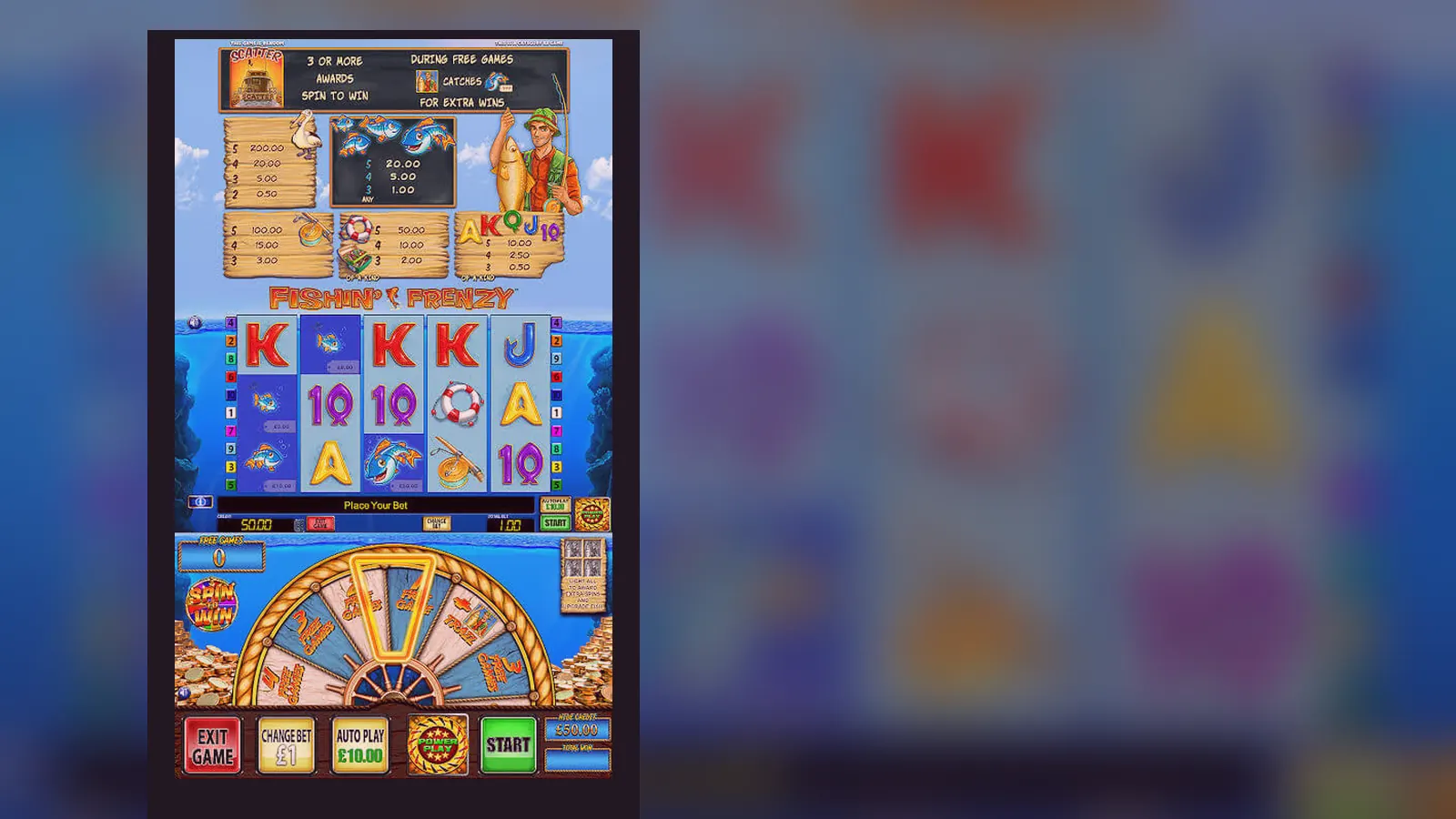
Most UK casino apps don't give you a separate download for each game — Fishin' Frenzy runs inside the operator's main app or in your mobile browser. What players call «the Fishin' Frenzy app» is either a web-app shortcut on your home screen or the casino's wrapper that hosts dozens of slots, including this one.
This page walks through what each install route looks like, what the interface shows you, how to tell a legitimate listing from a fake clone, and which permissions should raise a red flag. The game itself sits on Blueprint Gaming's servers; your phone just renders the reels and sends your stake choices back.
Store-style card: what the listing would show
If Fishin' Frenzy appeared as a standalone title in Google Play or the App Store — which it rarely does, because operators bundle their libraries — the metadata would look like this. These numbers are illustrative; actual stats depend on the operator publishing it.
The «in-app purchases» line reflects stake ranges. On a UKGC-licensed site, the upper boundary drops to £5.00 per spin for most players, and £2.00 if you're aged 18–24. Those caps are mandatory under the stake-limit rules that came into force in 2024.
Five screens and what each one does
When you open Fishin' Frenzy on a phone, you move through a short sequence. Here's what you see at each step, described as someone would explain it to a cautious friend who's never played before.
- Login or age-gate screen — If you're launching from a casino app, you log in or verify your date of birth. UKGC operators must confirm you're 18+ before letting you see real-money stakes. Demo mode, where available, still sits behind age verification on many sites.
- Game-selection lobby — A scrollable grid of slot thumbnails. Fishin' Frenzy usually appears near the top of the «Popular» or «Slots» filter. Tap the icon and the game loads in full-screen portrait or landscape, depending on your device orientation.
- Stake-selector overlay — Before the reels spin, you pick your bet per line. The interface shows a coin-value slider or a grid of preset stakes: £0.10, £0.20, £0.50, £1.00, up to the cap that applies to your account. The total stake (coin value × 10 pay-lines) appears at the bottom.
- Reel grid and controls — Five reels, three rows, the «Spin» button centred at the bottom, and a smaller «Auto» button if you want consecutive spins without tapping each time. The balance counter sits in the top-left corner; win amounts flash in the centre when a pay-line connects.
- Free-spins or feature screen — When you land three or more scatter fishermen, the display shifts to a new backdrop (the jetty scene) and counts down your free spins. Any fish symbols collected are banked and multiplied at the end. Once the feature finishes, you return to the base game with your updated balance.
That's the loop: pick stake, spin, wait for the outcome, adjust if needed, repeat. The interface is deliberately minimal — no complex menus or side-quests — so new players can start without reading a manual.
Four install paths, step by step, and the risk in each
There's no single «official Fishin' Frenzy app» because Blueprint licenses the game to dozens of operators. What you download depends on which casino you've chosen. Below are the four common routes UK players use, with numbered steps and the main risk to watch for.
Path one: mobile browser (no install required)
- Open Chrome, Safari, or Firefox on your phone and navigate to a UKGC-licensed casino site. Check the footer for the licence number and confirm it in the UKGC public register.
- Log in or register. You'll need to verify your age and identity — usually a photo of your driving licence or passport — before you can deposit.
- Tap the menu icon, find «Slots» or search «Fishin' Frenzy» in the game library.
- Tap the thumbnail. The game opens in your browser, full-screen. No separate download happens; the reels load from Blueprint's server via HTML5.
- Play directly. When you close the tab, the session ends, but your balance persists in your casino account.
Risk: phishing sites that mimic real casino domains. Always type the URL yourself or use a bookmark; never follow a link in an unsolicited text message.
Path two: add to home screen (web-app shortcut)
- Follow steps one to four above so Fishin' Frenzy is open in your browser.
- On Safari (iPhone), tap the share icon and select «Add to Home Screen». On Chrome (Android), tap the three-dot menu and choose «Add to Home screen».
- Name the shortcut — for example, «Fishin' Frenzy» — and confirm. An icon appears on your home screen.
- Tap the icon in future. It opens the game in a standalone browser window, without the address bar, making it feel like a native app.
Risk: none beyond path one. This method creates a bookmark, not a separate executable. You're still playing in the browser; the shortcut just hides the UI chrome.
Path three: operator's official app from Play Store or App Store
- Open Google Play (Android) or the App Store (iOS) and search for the casino brand — for example, «[Operator Name] Casino».
- Check the developer name matches the operator's legal entity, listed in the UKGC register. Fake clones sometimes use similar names with one letter changed.
- Download and install. The app size is typically 60–120 MB because it bundles the lobby, account screens, and game-loading framework.
- Open the app, log in, and navigate to Fishin' Frenzy in the slots library. The game itself still streams from Blueprint's server; the app is a wrapper that handles authentication, deposits, and withdrawals.
- Grant storage permission if prompted — the app caches game assets to speed up loading. Reject any request for contacts, camera, or microphone access unless you're uploading a document for KYC.
Risk: downloading the wrong app. Scammers publish clones with names like «Fishin Frenzy Slots» or «Fishin' Frenzy Casino» that look official but link to unlicensed sites or collect your payment details. The real app comes from the casino operator, not from Blueprint directly.
Path four: APK sideload (Android only, high risk)
- A third-party website offers an APK file — an Android installer package — claiming to be «Fishin' Frenzy» or a casino app.
- You download the APK to your phone, then go to Settings → Security → Install unknown apps, and enable installation from that browser or file manager.
- You run the APK. Android installs the app without Play Store verification.
Risk: malware, keyloggers, or fake casino fronts. APKs bypass Google's security checks, so there's no guarantee the file matches the legitimate app. Even if the game looks real, the APK might route your deposits to a scammer's account or steal your login credentials. UKGC-licensed operators publish through official stores; if an APK is the only option, the site is almost certainly unlicensed and illegal to use in the UK.
Phone requirements and what happens if your device is older
Fishin' Frenzy runs on HTML5, so the technical bar is low. Most phones sold in the past five years can handle it without stutter.
- Android: version 7.0 (Nougat) or later. That covers devices released from late 2016 onward. If your phone is running Android 6.0 or older, some casino apps won't install, and the browser version may load slowly or freeze during the free-spins sequence.
- iPhone: iOS 12.4 or later. That includes the iPhone 6s and everything newer. Older models (iPhone 6, 5s) can still open the game in Safari, but expect longer load times and occasional frame drops when all five reels spin at once.
- RAM: 2 GB minimum, 3 GB recommended. The game itself uses about 150 MB of memory, but the browser or casino app wrapper adds overhead. If you're multitasking with several apps open, close the ones you're not using to prevent crashes.
- Storage: 100–150 MB free space for cached assets. The app or browser stores reel graphics and sound files locally so they don't reload every spin. If your storage is nearly full, the game may lag as it tries to write new cache data.
- Internet: a stable 3G connection works, but 4G or Wi-Fi is better. Each spin sends a small data packet to the server (your stake and bet-line choice) and receives back the reel positions and win calculation. If your signal drops mid-spin, the outcome is still determined server-side; when you reconnect, the result appears and your balance updates.
If your device doesn't meet these specs, the game may still load, but you'll notice stuttering animations or a delay between tapping «Spin» and seeing the reels move. That doesn't change the RNG outcome — the result is decided the moment you tap — but it makes the experience less smooth.
What the app actually does behind the interface
When you tap «Spin», here's the sequence your phone and the server follow, start to finish.
- Your phone sends an HTTPS request to Blueprint's game server, carrying your session token (proves you're logged in), your chosen stake, and the number of pay-lines active — always 10 for Fishin' Frenzy.
- The server checks your casino-account balance with the operator's wallet API. If you have enough funds, it deducts the stake and generates a random outcome using a certified RNG (random-number generator).
- The RNG picks a stop position for each of the five reels. Those positions determine which symbols land on the three visible rows. The server calculates any wins according to the pay-table: matching symbols on a pay-line from left to right, multiplied by your coin value.
- The server sends back a JSON response with the reel positions, win amount, and updated balance. It also flags whether you've triggered the free-spins feature (three or more scatters).
- Your phone's app or browser receives the response and animates the reels to match the positions the server specified. The animation is cosmetic; the outcome was fixed in step two. If you won, the pay-lines light up and the win counter ticks up. If you triggered free spins, the screen transitions to the bonus round.
- The casino operator's backend logs the spin in your account history — stake, result, timestamp — for regulatory reporting and your personal transaction record.
That entire loop takes 1–2 seconds on a decent connection. The app's job is to display the outcome clearly, track your balance, and let you adjust your stake between spins. Everything that matters — fairness, payout calculation, balance updates — happens server-side, where the UKGC can audit it.
Version updates and what changed in the latest release
Blueprint and casino operators push updates periodically. The game mechanics — RTP, volatility, pay-table — never change in an update because those are certified. What does change: interface tweaks, bug fixes, and compatibility patches for new phone models.
Hypothetical changelog for version 3.7.1 (November 2026):
- Fixed a graphical glitch where fish symbols in the free-spins round appeared misaligned on iPhone 16 Pro Max in landscape mode.
- Improved load time by 15% on Android devices with 2 GB RAM by compressing cached reel assets.
- Added support for the latest SSL certificate standards, ensuring secure communication with the game server on older Android versions.
- Updated the stake-selector UI to highlight the £2.00 cap more clearly for players aged 18–24, in line with UKGC requirements.
- Corrected a rare crash that occurred when the app was backgrounded mid-spin and then resumed after 10+ minutes.
If you're playing in a browser, updates happen automatically — you're always running the latest version because the game loads fresh from the server. If you're using an operator's app, you'll see an update prompt in the Play Store or App Store when a new release is available. The prompt usually says «Update available» with a changelog summary. You can defer the update, but older versions may stop working after a few weeks if the server deprecates support.
Spotting fake clones and which permissions are a red flag
Scammers publish fake casino apps because they know players search for game names. A clone might look identical to the real thing — same logo, same reel graphics — but it routes your money to an unlicensed site or installs malware. Here's how to tell the difference.
Red flags in the app listing:
- Developer name doesn't match a known casino operator or Blueprint Gaming. If the listing says «Fishin' Frenzy Ltd» or «Slot Games Studio», it's a clone. Legitimate apps come from brands like «[Operator Name] Ltd» or «[Operator] Online Casino».
- No mention of a UKGC licence in the description. Real apps include a line like «Licensed and regulated by the UK Gambling Commission, licence number 12345-678». If that's missing, the app is unlicensed.
- Suspiciously low file size — under 20 MB — suggests the app is just a web-view wrapper that loads an external site, which could be a phishing page.
- Excessive permissions requested during install: contacts, camera (unless you're uploading KYC documents), phone calls, SMS. A slot game needs storage access for caching and maybe location to confirm you're in the UK. Anything beyond that is a warning sign.
- Generic or misspelt reviews: «This game is amazing I won so much money!» posted by accounts with no profile picture and one review each. Real reviews are mixed — some praise, some complaints about dry spins — and mention specific features like the free-spins multiplier.
Red flags after you open the app:
- The app asks for payment details before you've registered or passed age verification. Legitimate operators verify your identity first, then let you deposit via the account screen.
- No UKGC licence footer. Open the app's info or settings page and look for the regulator badge and licence number. If it's absent or links to an offshore jurisdiction (Curaçao, Malta), the site isn't legal for UK players.
- Unrealistic promises: «Win every spin!», «Guaranteed jackpot», or «100% RTP». Those claims are false. Fishin' Frenzy has a certified RTP of 96.00–96.12%, and no game guarantees wins.
- The app redirects you to a website that doesn't match the developer name in the store. For example, the listing says «BrandX Casino» but the in-app browser loads «fastcash-slots.net». That's a phishing redirect.
If you've already installed a suspicious app, uninstall it immediately, change your casino-account password, and check your bank statement for unauthorised charges. Report the app to Google Play or the App Store using the «Flag as inappropriate» option in the listing.
FAQ
Can I play Fishin' Frenzy offline after downloading the app?
No. The game requires a live internet connection because each spin is processed on Blueprint's server. The app caches graphics and sound to reduce load time, but the RNG outcome and balance updates happen online. If your connection drops mid-spin, the result is saved server-side; when you reconnect, it appears and your balance updates.
Why does the operator's app ask for storage permission?
It caches game assets — reel images, animations, pay-table data — so they don't reload from the server every time you open Fishin' Frenzy. That speeds up launch time and reduces mobile-data usage. Storage permission is standard for casino apps; reject camera, microphone, or contacts unless you're uploading a document for age verification.
Is there a difference between the browser version and the app version?
The game logic is identical — same RTP, same pay-table, same RNG. The app version loads slightly faster because cached assets are stored locally, and some operators add features like fingerprint login or push notifications for bonuses. If you prefer not to install anything, the browser version works just as well.
What happens if I update the app mid-session?
Your session ends when you close the app to install the update. Any in-progress spin completes server-side; when you log back in after updating, your balance reflects the outcome. Free spins carry over — if you had 8 of 10 remaining, they'll still be there. Avoid updating during a bonus round if you can help it, but you won't lose funds or progress.
Can I install the game on a tablet as well as my phone?
Yes. If you're using the operator's app, download it from the Play Store or App Store on each device and log in with the same account. Your balance and game history sync across devices because they're stored server-side. The browser route works the same way: open the casino site on your tablet, log in, and Fishin' Frenzy picks up where you left off on your phone.
Why do some casino apps show Fishin' Frenzy but others don't?
Blueprint licenses the game to specific operators. If an operator hasn't signed a deal with Blueprint, they won't offer Fishin' Frenzy in their library. The game is widely available on UKGC-licensed sites — you'll find it on most of the big brands — but smaller or newer casinos might not have it yet. Check the operator's slots lobby or use the search function before registering.